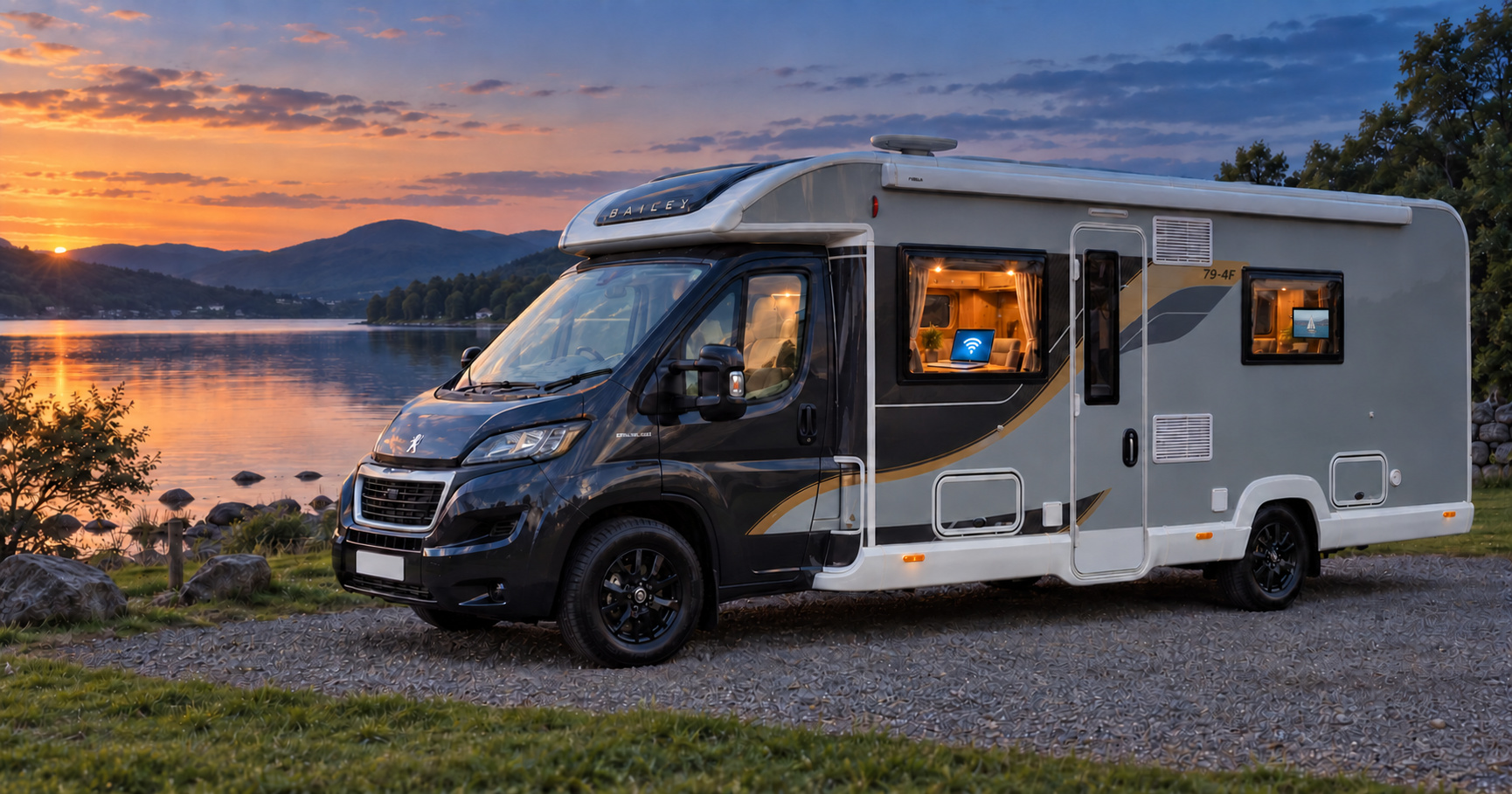
Touring WiFi, Sorted.
WiFi in your van.Without the confusion.
Getting online in a motorhome, campervan or caravan: what actually works and what it really costs.

By Ged Wilmot. Prices checked .
You want Netflix on the TV, internet access on the laptop, and no nasty surprises on the bill. How hard can it be?
The trouble starts when you ask about it in a Facebook group. Forty replies come back and no two of them agree. At least one bloke tells you to get "a booster", which turns out to mean three different things depending on who's saying it. So you buy a router. Then a better router. Then an aerial. And quite often none of it helps, because the problem was never the equipment.
This guide tells you what to buy and what to skip. It also gives you the ten-minute test that stops most people wasting a few hundred pounds on equipment they never needed. We've been through all of it ourselves, with the kids in the back asking why the iPad's stopped working and Netflix has frozen. Everything below is written for someone whose most technical job at home was typing in the WiFi password.
All of it applies just the same whether you've got a motorhome, a campervan or a caravan. We mostly say "van", because writing all three every time would drive us round the bend.
Prices come from UK retailers, listed at the bottom of the page. They move. Check before you buy.
Some links on this page earn us a small commission if you buy. It costs you nothing extra, and it never changes what we recommend.
What type of setup do you need?
There are several ways to get online in a van, all covered in "Pick your equipment" below. But nearly everyone falls into one of four camps. Find yours, and the rest of the guide is built around it.
In a hurry? Tap or click whichever card fits and it'll take you straight to the kit we'd buy, price and all. The reasoning is still here when you want it.
 I only need it on short trips
Share your phone's connection with the TV and laptop. Nothing to buy.
Equipment£0Datapotentially £0 extraPhone hotspot I want my phone back
A small rechargeable box with its own SIM, so your phone stays free for being a phone.
Equipmentfrom £44Data£3.33 to £20 a monthPortable routers I want it always on
A router that lives in the van and stays on, even when you're not there.
Equipment£170 to £500Data£3.33 to £20 a monthFitted routers I park with no signal
Satellite. Works with a clear view of the sky, but it drinks battery.
Equipment£179Data£55 to £100 a monthSatelliteCan't tell which you are? The 10-minute test below will tell you. It costs nothing, and skipping it is how most of the overspending happens.
Already bought something and it hasn't helped? Do the test on your phone anyway, before you spend another penny. It tells you whether there's any signal worth having where you park, and that's the one thing no router can fix.
Not sure which one fits? The WiFi setup finder asks you a few questions and narrows it down for you.
Sort my WiFi →Here's the thing to understand, and it takes about a minute.
Think of mobile signal like water pressure. The phone mast is the reservoir. Your van is a house at the end of a very long pipe. If the reservoir is low, or the pipe is blocked miles away, no amount of expensive plumbing in your kitchen will make water come out of the tap. You can fit the shiniest tap in the showroom. It'll still just gurgle.
A £500 router cannot invent a signal that isn't there. It can only make better use of one that already reaches your pitch.
Getting online in a van is a chain of four links, and every one of them has to hold.

- Mobile signal. Is there any signal where you've parked? Fails when there's no mast in range, hills or trees are in the way, or the mast is jammed with everyone else on site in peak season, or with the crowd at the festival you're parked at.
- Into the van. Metal and foil block it. Fibreglass lets it through. This is the only link an aerial can fix.
- Router or phone. Whatever the SIM lives in: your phone, a portable router, a fitted router or a satellite dish. Fails when the SIM is wrong, the data's run out, or the plan doesn't allow router use.
- WiFi to devices. The last few metres, sharing the connection with the TV and the laptop. Almost never the problem.
When someone says "my WiFi is rubbish", the fault is nearly always the mobile signal itself, or the signal struggling to get into the van (links 1 and 2). Then they go and spend money on a shiny new router (link 3).
And here's the trap that catches nearly everyone. Full WiFi bars on your phone or TV only prove the last few metres, the WiFi inside the van (link 4). They mean the TV can see the router. They say nothing at all about whether the router can see the internet. You can have five bars of WiFi and no internet whatsoever, and plenty of people have sat in a lay-by wondering why.
Buying a better router only ever helps with getting the signal into the van and receiving it (links 2 and 3). And getting it into the van is the one thing about your vehicle that changes the answer, so that's next.
The material your van is made from is important, because it's the one thing about your van that changes what you should buy.
Metal is the enemy. A panel van conversion (a Transit, a Sprinter, a Ducato with its original steel sides) is close to what physicists call a Faraday cage: a metal box that keeps radio waves out. It's the same reason your phone drops out in a lift. In your van, some signal gets in through the windows and not much else.
This isn't really the case with fibreglass. Most British coachbuilt motorhomes and almost every touring caravan have bodies made of GRP, which stands for glass-reinforced plastic, or fibreglass to the rest of us. Radio waves pass through it well. That's no accident: the covers that sit over radar dishes and phone-mast aerials are made from the same family of materials, precisely because radio goes straight through them.
Bailey's Alu-Tech construction, for instance, has an aluminium frame, but the frame is buried inside the panel. The surface is fibreglass and the insulation is polystyrene rather than foil-backed. That combination is about as good as it gets for signal, and we think it's part of why the built-in aerials on our own router have been enough for us.
Your windows aren't a problem either. Motorhome and caravan windows are acrylic, tinted by colouring the plastic itself rather than by a metallic film, so they don't block signal the way the coated glass in a modern car does.

The catch that trips up fibreglass vans
Some fibreglass vans have foil-backed insulation inside the walls, which puts the metal back in and undoes the advantage. You can't tell from the outside, and the brochure won't say. The 10-minute test below will tell you, which is exactly what it's for.
So, roughly: metal van, you'll almost certainly want an aerial outside the bodywork. Fibreglass body, you may well get away without one. Either way, don't take the brochure's word for it. Test it.
The 10-minute test that saves most people £100s
Print the free test sheet and take it to the van.
Two pages with the steps, a grid to write your numbers in, and what they mean. It works where your signal doesn't.
Before you spend a penny, find out what signal you've actually got. You need your phone and about ten minutes. Do it on a campsite or at a park-up, somewhere you'd actually want to get online, rather than on your driveway at home. Your driveway isn't where the problem happens.
People often waste way too much money on buying an expensive router and a roof aerial to fix a problem that turned out to be a lack of network signal rather than their van.
First, get the free Speedtest app by Ookla from the App Store or Google Play.


After installation, the app throws a few things at you. None of them is anything to worry about. Tap Don't allow or Reject all to each one, apart from location, where Only this time (Android) or Allow while using app (iPhone) is fine. The printable sheet lists every one, in order, for both.
Then you'll see the Go button. DON'T PRESS IT JUST YET.
Then:
- Turn off any VPN. If you use one, it slows the result and reports you as being in the wrong city entirely.
- Turn WiFi off on your phone. Settings, WiFi, off. This forces the phone onto mobile signal, which is what you're testing. Leave it on and you'll accidentally measure the campsite's broadband.
- Sit where you normally sit - at the table, on the sofa or in bed. Press Go. Write down the download speed, the upload speed and the ping.
- Stand outside the van by the door. Test again. Write it down.
- Repeat once in the evening, around 8pm, when the site is busy.
That's it. Three tests, 10 minutes, and you now know more about your own situation than any article can tell you.
If outside turns out to be much better than inside, try one more thing before you spend anything: hold the phone up at a window, or move whatever you're using nearer to one. Sometimes moving the box is the whole fix.
One small thing worth knowing: each test uses data, and the faster your connection, the more it uses, because the app runs flat out for a set time. On a slow connection that's a few megabytes. On fast 5G a single test can use over 100 MB. Nothing on a normal plan, but don't run it twenty times on a 2 GB SIM.
1. Tap "Detailed result".

2. Write down A, B and C.

Four things on that screen matter. Start with the first, because it decides whether the other three count.
Which connection it tested. Before you write anything down, look near the bottom of the result screen. The app shows what it used: your mobile network's name next to a small 4G, LTE or 5G badge. That's what you want. If it shows a WiFi symbol instead, or the name of a WiFi network, you've measured somebody's broadband and the whole test is void, so turn WiFi off and run it again. One thing to ignore while you're down there: the name on the right-hand side is the test server it connected to, not your network.
Download speed. The headline number, and the higher it is the faster things arrive. It's measured in Mbps, which stands for megabits per second and which you never need to think about beyond "more is faster".
Upload speed. The forgotten one. Higher is better here too, but the numbers are always smaller than download and that's normal. Video calls and security cameras are what need it.
Ping. How long the connection takes to react, in milliseconds (ms). This one's the other way round: lower is better.
The app gives you three ping figures, labelled Idle, Download and Upload. Write down the Idle one. The other two matter if you make video calls, and there's an expander further down that explains why.
What your numbers mean
Mobile speeds drop in the evening. If you're near the bottom of a band, expect the one below it at 8pm.
Download is how much can arrive at once. Use the figure from where you sit inside the van.
| Download speed | What that gets you |
|---|---|
| Under 2 Mbps | Messages, email, maps and a bit of web browsing. Netflix will try to play in standard definition, but expect it to stop and start. |
| 2 to 5 Mbps | One person streaming: standard definition at the bottom of the range, HD at the top. Netflix asks for a minimum of 3 Mbps for HD and 5 Mbps for full HD, so expect the odd pause to buffer when the site gets busy. |
| 5 to 10 Mbps | HD on one TV without buffering, or a video call, with a phone or two browsing alongside. Fine for a couple. |
| 10 to 25 Mbps | Everyone in the van online at once: HD on the TV, someone on a video call, phones and tablets doing their thing. |
| 25 Mbps and up | 4K on the TV with room to spare, plus the range where big downloads stop eating your evening: game updates, work files, software updates. Netflix asks for a minimum of 15 Mbps for 4K. Above this, extra speed makes very little difference in a van. |
Upload is what you send out. It's always a smaller number than download, and that's normal rather than a fault.
| Upload speed | What that gets you |
|---|---|
| Under 1 Mbps | Fine for browsing and email. Video calls will be a struggle. |
| 1 to 5 Mbps | Video calls work. Enough for a security camera or two on the van. |
| 5 Mbps and up | A good mobile connection. Nothing in a van needs more than this. |
Ping is how quickly the connection reacts. Lower is better, and it matters for video calls and online gaming rather than for streaming or browsing.
| Ping (idle) | What that gets you |
|---|---|
| Under 60 ms | Video calls and gaming will be fine. |
| 60 to 300 ms | Usable. The odd stutter on calls. |
| Over 300 ms | Calls will struggle, and above 500 ms they'll drop, however fast the download looks. |
Now the comparison that matters.
Remember what you've just tested: your phone, where you park. So the result tells you whether the phone on its own will do, and what to buy if it won't.
Good numbers inside the van? You may not need to buy anything at all. Turn on your phone's hotspot and connect the TV and the laptop to it. Heat, the battery and your data allowance are what usually push people into buying a separate router later, rather than the signal.
Outside is much better than inside? The walls are reducing your signal. Try the free fix first: move the phone to a window and test again, because that's often the whole of it. If it isn't, know that a portable router won't help either, since its aerials sit inside the same van. What helps is a router with aerial sockets plus an aerial mounted outside the bodywork. An aerial on its own does nothing; it needs a router to plug into.
Outside is bad too? Your network doesn't reach this pitch, but another one might. Check Ofcom's coverage map, or borrow a phone on a different network.
Fine in the day, useless at 8pm? The mast is busy rather than weak, so an aerial barely helps. A second SIM on a genuinely different network is the answer, and it can sit in your phone or in a portable router. There's a section on choosing one further down.
One more free check before you buy anything. Ofcom's Map Your Mobile shows predicted coverage for every network at any postcode, indoors and out. It's a prediction rather than a promise, but it'll tell you quickly whether somewhere is a known dead spot.
Pick your equipment
Four routes, matching the four camps at the top of the page. Same shape each time: what it is, who it suits, where it falls down, and the one product we'd buy. Prices are what we found at the named UK retailer on the date at the top of the page; the buttons take you to the current listing.
At a glance: what we'd buy
| Your situation | Our pick | Equipment | Data | Link |
|---|---|---|---|---|
| Short trips only | Your phone's hotspot | £0 | Potentially £0 extra | How to set it up ↓ |
| You want your phone back | TP-Link M7010 V2 | £44.34 | £3.33 to £20 a month | Check price ↗ |
| Always on, no aerial needed | Kuma Connect Lite | £169.54 | £3.33 to £20 a month | Check price ↗ |
| Always on, with a roof aerial | Maxview Roam | £298.95,plus fitting | £3.33 to £20 a month | Check price ↗ |
| Always on, nothing on the roof | GL.iNet Spitz AX | £340.99 | £3.33 to £20 a month | Check price ↗ |
| No phone signal where you park | Starlink Mini | £179 | £55 or £100 a month | Check price ↗ |
1. You only need it on short trips
Every modern phone can share its mobile data with your other gadgets. Switch it on, and the TV and the laptop join it exactly like the WiFi at home.
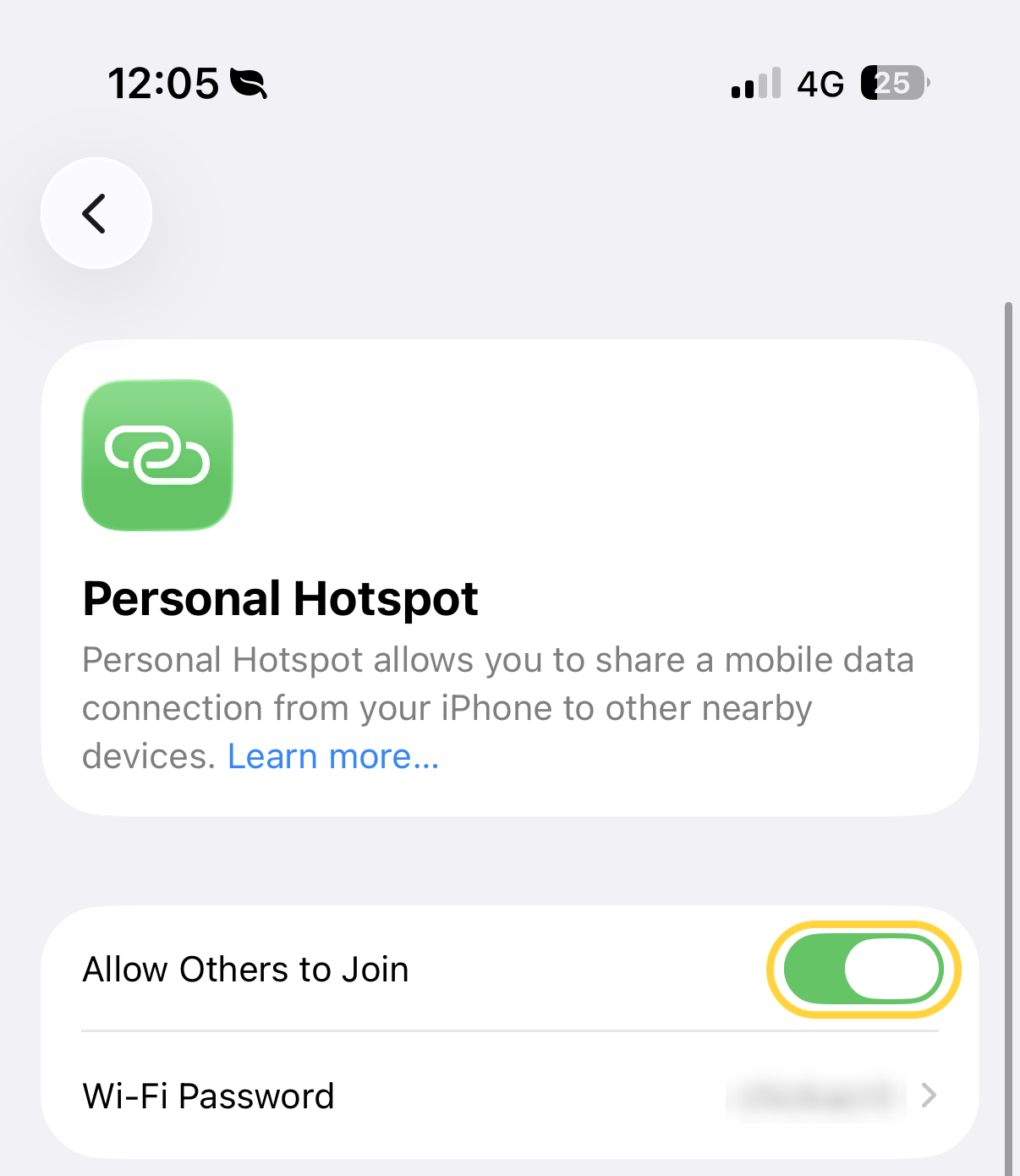
On an iPhone: Settings, then Personal Hotspot, then turn on Allow Others to Join.
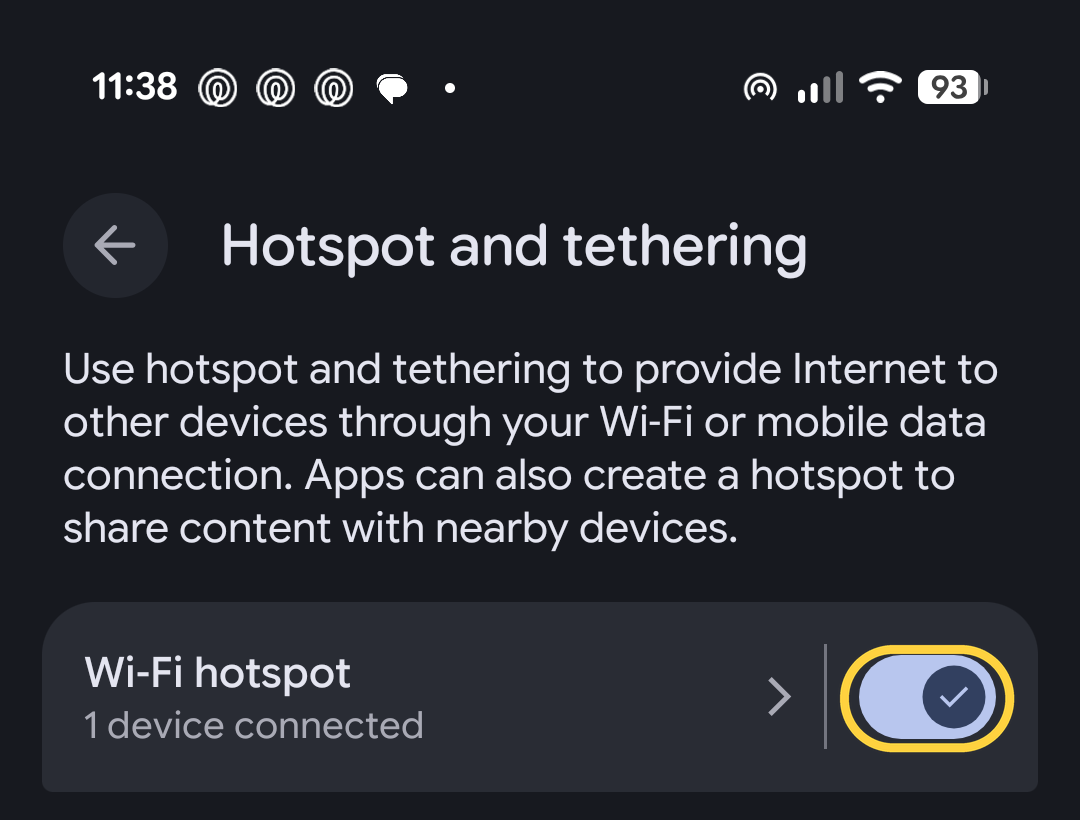
On Android: the wording varies between makes. On a Google Pixel it's Settings, then Network & internet, then Hotspot & tethering, then Wi-Fi hotspot. On a Samsung it's Settings, then Connections, then Mobile Hotspot and Tethering. On most Android phones there's a quicker way: swipe down from the top of the screen and tap the Hotspot button.
Good for: weekends, holidays, one or two people. This covers most owners for most of the year, and it costs nothing up front.
Where it falls down: the phone gets properly hot and the battery empties in a couple of hours. It also has to sit wherever the signal is, usually a window, rather than next to you on the sofa, so your phone is across the van all evening.
Free of equipment. Not necessarily free of charge. The allowance that was plenty for one phone won't cover a TV streaming every evening. Claire's plan was 10 GB a month, which was fine until we started running the laptop and the TV off it, at which point we moved her to 100 GB. Work out what you'll actually use (there's a table in the SIM section further down) before deciding this option costs nothing.
The cheapest step up from here: a SMARTY 40 GB data SIM at £13 a month in an old spare phone. Leave the spare phone in the window, hotspot from that, and your main phone stays free for being a phone.
SMARTY 40 GB Data Only
£13 a month
at SMARTY
A data-only SIM for the spare phone. 12 GB of EU roaming, and it can be paused.
- Equipment cost:
- £0.
- Data cost:
- potentially £0 extra.
↑ Back to the at-a-glance table
2. You want your phone back
A small rechargeable box with its own SIM card in it. It does one job - turning mobile signal into WiFi, and it does that job better than a phone. You can also perch it in whichever window has the best signal while you sit somewhere comfortable.
The advantage that gets overlooked: it runs off its own battery, so it keeps working while you're driving, which is handy on a long drive.
Where it falls down: it's still inside the van, behind the same walls as your phone, so portable doesn't mean better reception. Most of them, including the one below, have their aerials sealed inside, so you can't plug a roof aerial in later. And don't leave one plugged in for months at a time. They're built to be charged and used, and a lithium battery held at full charge permanently is how they swell and fail. If you want internet in the van all the time, buy something designed to be wired in, which is the next route.
Our pick is the TP-Link M7010 V2 at £44.34. Cheap, from a brand that will still exist next year. It does everything this route needs.
If you want 5G in a portable box, the one with dependable UK stock is NETGEAR's Nighthawk M7 at £529.99 direct from NETGEAR. That's fitted-router money for something you still have to charge, so unless you work from the van and park near towns, the £44 one does the job. We're keeping an eye out for a sensibly priced 5G one and we'll add it here when we find it.
- Equipment cost:
- from £44.
- Data cost:
- £3.33 to £20 a month.
↑ Back to the at-a-glance table
3. You want it always on
A router that lives in the van, runs off the 12V system and stays on, whether you're in it or not. This is the route for anyone who's away a lot, or who wants security cameras watching the van while they're not in it. It's also for anyone tired of hunting for their phone every evening.
Before you choose a router, answer one question: do you need an outside aerial? The results of the 10-minute test will have given you this information.
Signal inside is about the same as outside, with usable upload and download speeds? No aerial needed, so start with route A.
Outside signal clearly better than inside, or a metal van, or you tour where signal is marginal? You need an aerial, so go to route B.
You need an aerial but nothing is going on your roof? Follow route C.
A.No outside aerial needed
Our pick is the Kuma Connect Lite at £169.54. Put a UK SIM in and it sets itself up, with no settings page to wrestle with. It's from a UK company in Wolverhampton, comes with a two-year warranty, and buyers rate it well.
It runs from 12V or the mains, has two Ethernet sockets if you ever want to plug something in with a cable, handles up to 32 devices at once and sits in a solid metal case rated well beyond anything a British winter will throw at it.
Two quirks worth knowing. It only broadcasts the 2.4 GHz WiFi band, which is the slower, longer-reaching one; in a van you won't notice, and it's the band security cameras want anyway.
And it has one socket for an external aerial where the alternative below has two. That matters more than it sounds: a roof aerial for 4G normally has a pair of cables coming out of it, because the router uses two aerials at once to make a weak signal more usable, and some 5G aerials have four. Plug only one in and you get some of the benefit rather than all of it. So if a roof aerial looks likely later, start with the alternative below instead.
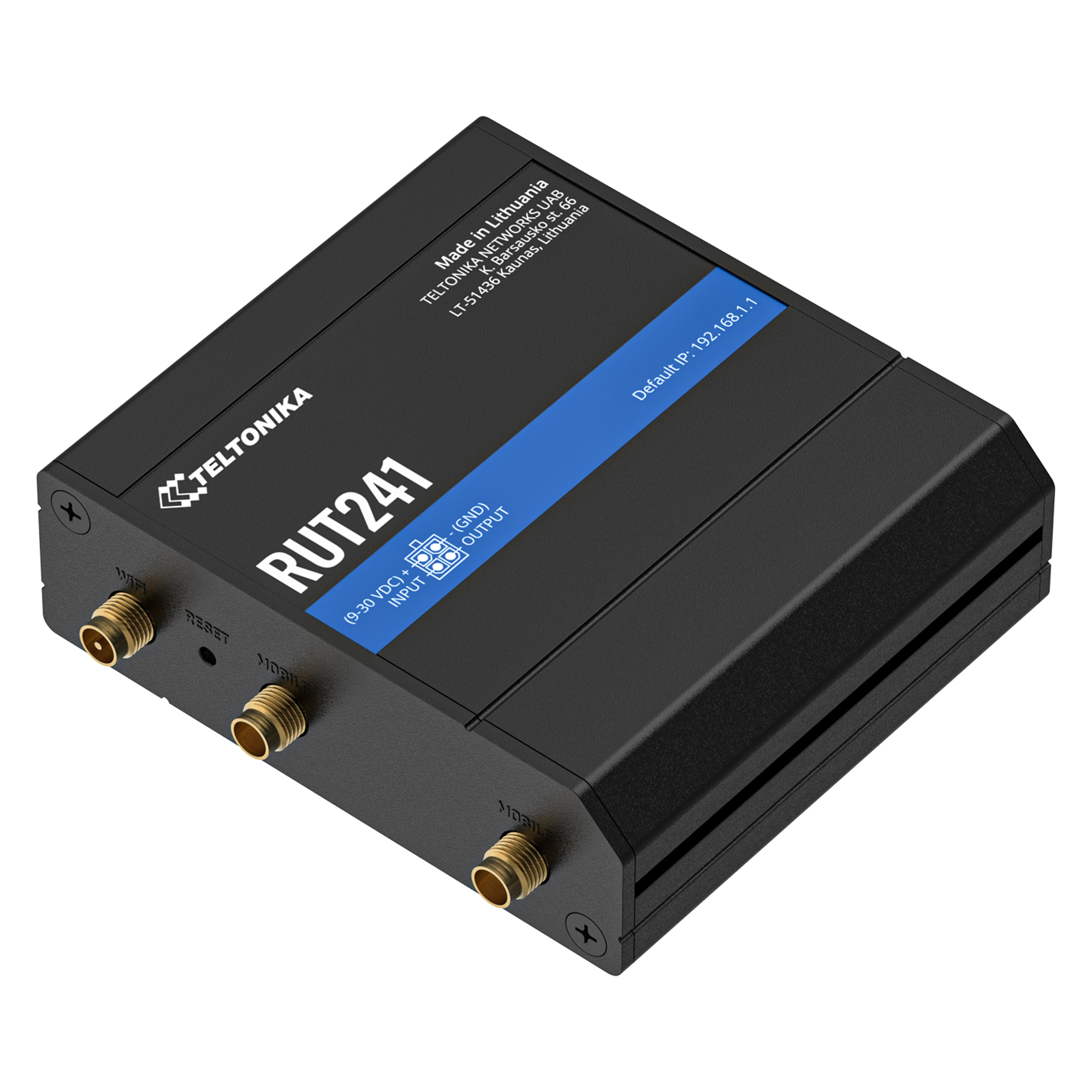
The alternative, for anyone happy to spend ten minutes on a settings page, is the Teltonika RUT241 at £179.50 from Solwise. Teltonika are the boring, industrial, never-falls-over brand. This is the same router Maxview fit inside the Roam, and it has two proper sockets for a roof aerial, so the full upgrade bolts on later if you need it. It sips about 1.3 watts.
Be honest with yourself about what you're buying here. Neither of these will beat a modern phone for speed on its own. Their modems are a few generations behind the one in your pocket. What £170 buys is a connection that's always on, runs from 12V, draws less than a reading light, and never rings. If you want more speed, that comes from an aerial (route B) or from the step-up.
The step-up is the GL.iNet Spitz AX at £340.99 from GL.iNet's UK store. The extra money buys four larger mobile aerials sticking out of the box (plus two for the WiFi) and 5G. It also has two SIM slots, so you can carry a backup network in the router itself rather than falling back on your phone's hotspot every time. And its power input accepts anything from 9 to 36 volts, which means it shrugs off the way a van's supply swings between flat and charging.
It does run warm, and its fan doesn't start until the chip hits 70°C, so give it a bit of air if you easily can. Ours lives in a closed cupboard and has been fine, but a hot day and a sealed box is the combination to watch. It's what we run, and there's more on that further down.
If you're comparing 5G routers elsewhere, note that the Teltonika RUTX50 often comes up: Teltonika announced its end of life in August 2026, so it's not one to buy new now.
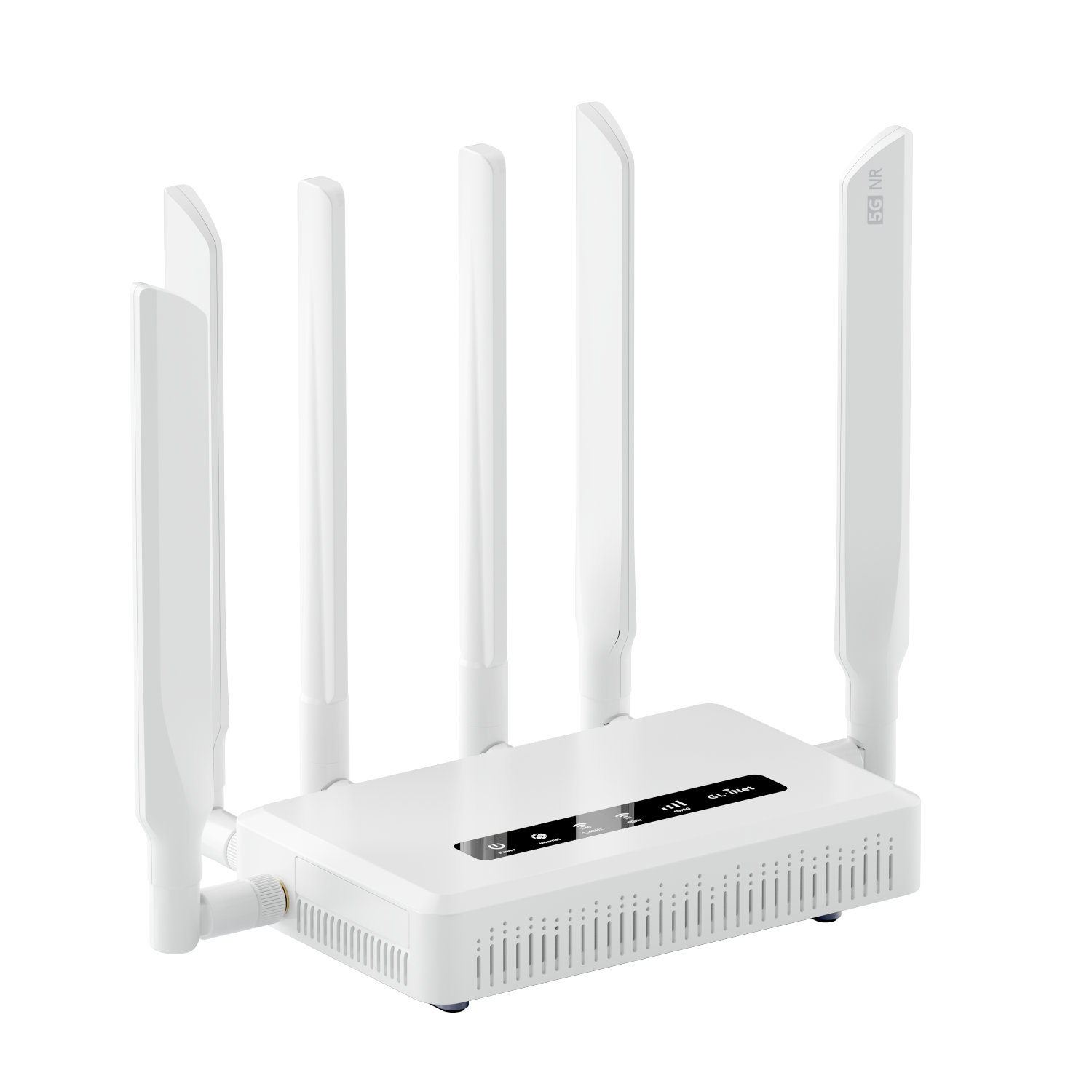
Don't be caught out by the name. It's often listed as the "AX3000", which is the WiFi speed class rather than the model. The model is GL-X3000, and it comes in a cheaper 4G version and a dearer 5G one. Check which you're buying.
B.Outside aerial needed
Both options here are based around the same equipment: a router inside, an aerial on the roof, and a cable between them. The difference is whether you buy it as one box or two.
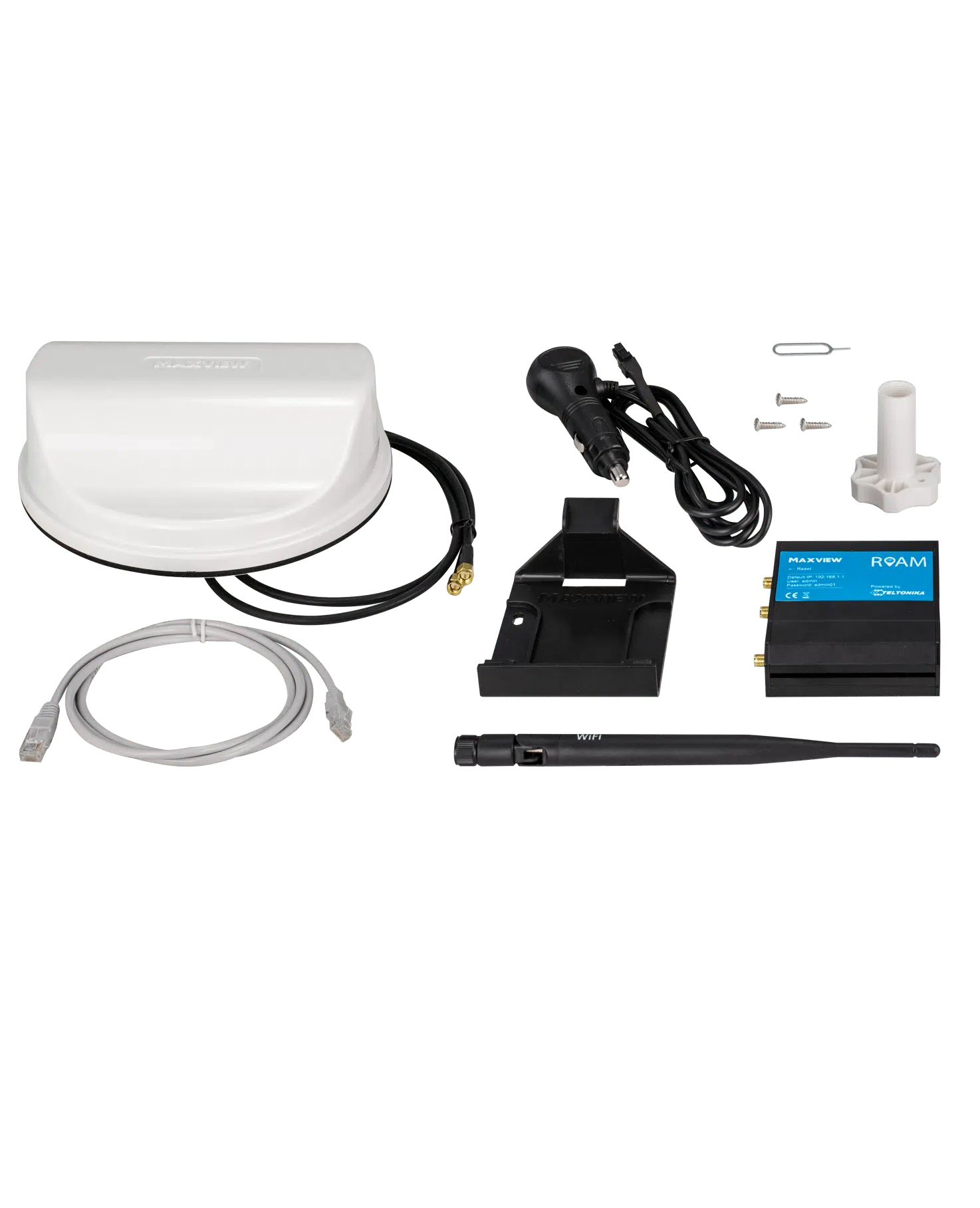
Maxview Roam MXL050
£298.95
at Grasshopper Leisure
Router, roof aerial, cables and brackets in one box
Our pick is the Maxview Roam at £298.95. Router, roof aerial, cables, brackets and a 12V lead, all in one box, from the best-known UK name in this category, and the parts have already been checked to work together. The aerial fixes to the roof and the cable comes through it, so this is a fitting job rather than a plug-in one.
One check before you buy. The current Roam ships with a Teltonika RUT241 inside. Older stock and second-hand units may have the earlier RUT240, which stopped getting software updates at the end of 2025. Ask the supplier which one they're sending, and look at the sticker on the router when it arrives.
Maxview make two dearer versions, and the names don't make the difference obvious. The Roam X at £458.95 is not a 5G system: it's the same aerial with a faster 4G router behind it, doubling the ceiling from 150 Mbps to 300 Mbps, and adding a second SIM slot, four Ethernet sockets and both WiFi bands. Maxview's own line is that it copes better with several heavy users at once. The Roam 5G at £664.95 is the one that's actually 5G, with a bigger aerial carrying four cables instead of two.
For most people the standard Roam is plenty, because 150 Mbps is far more than a van needs. Step up to the Roam X if several of you are streaming and working at once, and to the Roam 5G only if you want 5G speeds and park where there's 5G to be had.
One thing to know before you plug it in: every Roam ships with a Maxview SIM already in the router, on an unlimited plan at £19.99 a month. You're not tied to it, and it's dearer than the data SIMs in the SIM section below, so compare before you activate it. One more thing worth knowing: that Maxview SIM runs on Vodafone. So if you keep it, the backup SIM in your pocket needs to be on EE or O2, or you've got two SIMs sharing the same masts.

Teltonika RUT241 plus Poynting PUCK-2 V2
about £240
at Solwise + Broadband Buyer
Router and roof aerial bought separately
The alternative is the same idea bought as two parts: a Teltonika RUT241 (£179.50, Solwise) plus a Poynting PUCK-2 V2 roof aerial (£60.56 at Broadband Buyer). Around £240 together, so about £60 less than the Roam, and the PUCK is a slightly better aerial, ready for 5G if you ever change the router. The trade is two boxes to marry up and a settings page to go through.
The PUCK arrives with every mounting option in the box: an adhesive foam pad, a magnetic base, threaded spigots for bolting it through the roof, and brackets for a pole or a wall. Its cables end in the same SMA plugs the RUT241 uses, so they screw straight on with no adapters needed.
Having it fitted, whichever you choose.
Be realistic about the drilling. Sticking an aerial down avoids making a hole for the mount, but the cables still have to get inside the van somehow. Unless you can route them through something that already exists, like the gland your TV aerial or solar panel cables come through, you're making a hole. (A gland is the little waterproof cover that seals a cable where it passes through the roof.) If you bolt it through instead, Poynting's own instructions call for a 22 mm hole and a proper motorhome sealant such as Sika or Dekalin around the spigot. That's the bit worth paying someone to do properly.
Maxview recommend professional installation and run a postcode search on their site to find installers near you. Plenty of motorhome specialists supply and fit it, among them Motorhome Workshop, SplitCharge in Rotherham and Salop Towing. It's about two hours' work: the aerial is quick, and most of the time goes on routing the cable and wiring a fused 12V spur. Paying someone adds roughly £105 to £200, and for a sense of the top end, SplitCharge list the dearer Roam 5G supplied and fitted at their Rotherham centre for £880.
Two things worth more than the fitting fee: a badly sealed roof hole is exactly what a damp claim gets refused over, and fitted accessories are often capped on a motorhome insurance policy, so ring your insurer and declare it.
C.You need an aerial, but nothing's going on the roof
Start with the router on its own, in a window. Buy the GL.iNet Spitz AX (£340.99), stand it in whichever window gave you the best reading during the test, and run the test again from the router's connection. It has four large aerials of its own, and they'll pull more out of what reaches that window than your phone managed from the table. In a fibreglass van that's often the end of it. In a metal van it won't fully make up for the walls, because the signal has already been weakened before it gets inside, but it can still be a worthwhile jump and it costs you nothing extra to find out.
Add a window aerial only if that isn't enough. These stick to the inside of the glass, so the signal only has to get through a window rather than a steel wall. Not as good as a roof aerial. In a metal van, a great deal better than nothing. The Kuma Play is £104.29 and the Poynting PANL-401 is £166.33, both from Solwise. The Spitz has four aerial sockets with SMA plugs, and both of these use SMA too, so either one screws straight on later without anything being wasted. If you go for the Kuma, buy the SMA version of the Kuma Play, not the Connect Play, which has different plugs made for Kuma's own router.
- Equipment cost:
- £170 to £500.
- Fitting cost:
- £105 to £200 more if someone else does it.
- Data cost:
- £3.33 to £20 a month.
↑ Back to the at-a-glance table
4. You park with no signal
Satellite internet. It doesn't care whether there's a phone mast for thirty miles, which is the entire point of it. It needs a clear view of the sky, and it uses power in a different league to everything else on this page.
Starlink Mini is the one for a van: about the size of a laptop, 1.1 kg, and it runs straight off 12V with no inverter. Hardware is from £179 depending on where you are.
There are two Roam plans: Roam 100 GB at £55 a month, which keeps running at reduced speed once you've used the 100 GB, and Roam Unlimited at £100 a month, which doesn't have the ceiling and allows in-motion use. For most people touring the UK, 100 GB is the one: that's around 33 hours of HD TV. Unlimited earns its keep if the van is where you live and work, or if you want the connection running while you're driving.
Between trips you can drop it into Standby Mode at £9 a month, which keeps the account alive on a slow trickle so you're not paying full price for a van in storage, and there's no penalty for switching it back on. Starlink have put that price up twice already, so check it before you rely on it.
Two current gotchas. The £55 plan doesn't work outside the UK; Europe needs a dearer plan, and the details are in our European guide. And Starlink's newest full-size dish has no standby mode and no GPS, so for a van the Mini remains the one to buy.
Where it falls down: trees, and power. A branch over your pitch will interrupt it. And left on all day it draws 15 to 30 watts continuously, which is 30 to 60 Ah a day from your leisure battery, or roughly everything a standard 100 Ah lead-acid battery can safely give you before you've boiled a kettle. It needs lithium and decent solar, or you run it a few hours a day and accept that. If cameras are your reason for wanting a connection, the power draw alone rules satellite out.
- Equipment cost:
- £179.
- Service cost:
- £55 a month for 100 GB or £100 a month unlimited, dropping to £9 a month on standby between trips.
↑ Back to the at-a-glance table
One more thing before you choose: your leisure battery
If you spend any time off hook-up, this matters more than speed does. Here's how much each one takes from your battery if you leave it switched on for 24 hours.
Three things follow from that chart, and they're worth reading slowly.
A 4G router is effectively free to run. Three to four amp-hours a day, round the clock, which is a few per cent of a 100 Ah lithium battery. There's no power argument for ever turning it off.
5G uses about three times the power of 4G for the same job. A 5G router sitting idle uses more power than a 4G router flat out. Unless you need the speed, 4G is the better choice for a van.
Starlink Mini will flatten a normal leisure battery in a day. Run it 24 hours and it uses what a 100 Ah lead-acid battery can safely give, before the fridge and the lights. Lithium and solar, or a few hours a day.
Still torn between two of these? That's exactly what the WiFi setup finder is for. Answer a few questions about how you travel and what you need, and it'll pick one.
Sort my WiFi →You've picked a box. Now the bit that catches people out.
The SIM is where people get stung
You can buy the perfect router and still end up with nothing working, because of the SIM card inside it. We're not going to list this month's cheapest deals, because they change weekly and there are whole websites dedicated to keeping track of them. What matters here is the four things those sites can't tell you, because they're specific to living in a van.
1. Check it's allowed in a router. The networks draw a line between using data on a phone and using it in something else, and the wording is stricter than most people expect. O2's fair usage policy says an O2 SIM can't be used in hardware other than what it was supplied with, and the example they give of breaking that rule is putting the SIM in a modem instead of a phone or tablet. Tesco Mobile, which runs on O2, say plainly that their unlimited SIM can't go in a home router. Lyca's unlimited plan reserves the right to suspend you for using it in anything that isn't a handset.
There's a second layer that catches careful people out. Tethering permission is not the same as router permission. VOXI, 1pMobile and giffgaff all say clearly that you can use your phone as a hotspot, which is tethering. None of them goes on to say you can take the SIM out and put it in a router. In practice plenty of people do exactly that and never hear a word about it. Just know you're relying on something the terms don't promise, and if the connection is doing a job that matters, buy a SIM sold for the purpose.
2. Match the plan to how often you go out. Plenty of us use the van all year, and if that's you, an ordinary rolling monthly plan is exactly right and you can skip this one.
If the van goes into storage over the winter, though, you don't want to be paying for a SIM that's sitting in a cupboard. Two ways round it. SMARTY have an actual "Pause plan" button in your account, which almost nobody else offers, so you stop paying in October and start again in spring. Or buy a one-off annual pack, like Three's 120 GB data SIM at £40 for twelve months, which works out at £3.33 a month with 24 GB of EU roaming inside it. Buy it, forget it, use it up whenever you're out.
There's a trap in leaving an ordinary pay-as-you-go SIM in the router all winter: it may be dead by spring. O2 disconnect after six months without any chargeable activity, Three do the same after 180 days, and EE hibernate the account at 180 days and disconnect at 270. Pausing or an annual pack sidesteps that too.
3. Know which network you're actually on. Most SIM brands rent space on somebody else's masts, and it matters more than it used to. That's the next section.
4. If Europe's on the cards, check the roaming allowance and the time limit. UK plans give you a fraction of your UK data abroad and most have a rule about how long you can be away. Our European guide has the detail.
What we'd recommend, and what we actually run
For a router in the UK, a SMARTY 40 GB data SIM at £13 a month, or SMARTY Unlimited Data Only at £20 if you're streaming every night. Both are sold for routers and dongles, both include 12 GB of EU roaming, and both can be paused when the van goes away. That combination is why we recommend them: anyone can buy one, and none of it comes with a catch.
SMARTY 40 GB Data Only
£13 a month
at SMARTY
Enough for browsing, video calls and an HD film a week.
But that isn't what's in our router, and it would be a bit rich not to say so. Ours is a prepaid EE SIM from Scancom, bought in June 2026 as one payment covering us through to the end of March 2028. List price is a few hundred pounds; we picked ours up for about £197 using a voucher code doing the rounds on HotUKDeals at the time. That's 21 months of unlimited data on EE for £197, which is £9.30 a month, against £20 a month for SMARTY Unlimited.
So why isn't that the recommendation? Five reasons, and they may or may not matter to you. It's UK only, with no roaming at all, so it's no use the moment you cross the Channel. You can't pause it; the clock runs whether you're touring or not. These SIMs are sold to businesses and sole traders rather than to ordinary consumers. The price we paid depended on a voucher code that came and went, so you can't just go and buy the same deal today. And there's no account or app to log into, so no way of seeing how much data you've used: we rely on the counter built into the router instead. That's a bit of a nuisance when there's a 650 GB fair use limit sitting in the terms.
There's a coverage question too, and it's less clear-cut than the arguments in the Facebook groups suggest. SMARTY runs on the VodafoneThree network and Scancom's SIM is EE. Ofcom's figures don't crown a single winner in the countryside: in January 2026, 84% of the UK's land had good 4G from all four networks, and 96% from at least one, so which network works depends on exactly where you park. So don't pick a network on reputation. Put the postcodes you actually tour into Ofcom's coverage checker and see which one wins where you go.
One more honest catch. Data-only SIMs are usually dearer than ordinary SIMs with minutes and texts you'll never use. You can often find 50 GB on an ordinary plan for a third of the price of a data SIM. What the data SIM buys you is a clear answer on router use and the ability to pause. If you'd rather have the cheaper one and take your chances on the small print, that's a perfectly reasonable choice, and we'd rather say so than pretend otherwise.
For today's actual prices, MoneySavingExpert and uSwitch both keep live comparison tables and update them daily. Take the four rules above with you and use their filters.
Our SIM guideWhich SIM, and which network is it really on?Every brand and the network behind it, plans you can pause, annual and prepaid SIMs, roaming allowances, and the ones to avoid in a router.Read our SIM guideHow much data do you actually need? This is where people either overpay for unlimited they'll never touch, or get a nasty shock. The numbers are easier than you'd think. Per hour:
So a film every evening in HD is roughly 6 GB a night, or 90 GB over a fortnight's holiday. Two hours a night for a whole month is around 180 GB. Meanwhile a fortnight of satnav, music, email and browsing put together barely touches 5 GB. Which means 40 GB covers browsing, video calls and an HD film a week, and nightly HD on the TV wants an unlimited plan.
The one that catches everybody out
Your phone quietly backing up a single ten-minute 4K video to iCloud or Google Photos uses about 1.7 GB, which is over half an hour of Netflix in HD. If the phone is set to record 4K at 60 frames a second, that same ten minutes is nearer 4 GB, which is more than a full hour. Turn off automatic photo and video backup over mobile data, and turn off automatic app updates. Do it on every phone and tablet in the van, not just yours.
"Unlimited" data nearly always has a limit. It's buried in what the networks call a fair use policy, or FUP, and the figure varies: EE treat over 600 GB a month as excessive, 1pMobile use 500 GB, and our own Scancom EE SIM has 650 GB written into its terms. You're very unlikely to reach any of them in a van. 650 GB is around 90 hours of 4K Netflix in a month.
What happens if you do go over depends on the network, and it's worth knowing which sort you've got. Most big networks slow you down or push you onto a different plan. Some of the prepaid business SIMs reserve the right to suspend the service instead, which is a rather bigger deal. If you're a heavy user, find the fair use figure before you buy and check what the terms say happens when you pass it.
And watch for the other trick: some plans use "unlimited" to mean unlimited social media or music only, with everything else coming out of your ordinary allowance. Read what's actually unlimited before you pay for it.
Check your second SIM is on a different network
This is the single most out-of-date piece of advice in motorhome circles, and most guides still get it wrong.
The old logic was sound. Carry two SIMs on two different networks, so that when one is busy or has nothing, you switch to the other. But Vodafone and Three merged in June 2025 and they now share masts. Customers of both, and of every brand that rides on either of them, connect to whichever of the two masts is stronger. Which matters if you'd paired, say, a Vodafone SIM with a SMARTY one. SMARTY has always run on Three, so it was never a backup for a Three SIM. What's changed is that it isn't a backup for a Vodafone one either. They're the same network now, and so use the same masts.
There are now only three real mobile networks in the UK: VodafoneThree, EE and O2. Every other name you'll see on a SIM, and there are dozens, rents space on one of those three. The chart below shows which brand uses which.
If you want a real backup, your main SIM and your second SIM have to come from two different columns. Check the network behind each brand before you buy, not after. Our SIM guide lists every brand and its network.
And if the backup SIM is going in the router rather than a phone, remember the tethering point from the last section. A phone SIM will very likely work in there; it just isn't what the terms promise. Keeping the backup in a phone sidesteps that entirely, and it's what we do.
The cheapest version costs nothing. If there are two of you, make sure your phones are on networks from two different columns. Then you've always got a second option in your pocket.
One more thing if your router has two SIM slots: two slots usually means the router swaps between them, not that it uses both at once. Check the manual before you rely on it switching by itself.
Here's what all of that looks like in practice.
What we run in our own van, and the night it let us down
We started exactly where this guide tells you to start: on our phones. Claire's on 1pMobile, which uses EE's masts, and I'm on Lebara, which uses Vodafone's. That's deliberate, and it's the backup rule from the last section in action. Two different networks means that when one has nothing, the other usually does. When we wanted Netflix or the laptop, we'd hotspot from whichever phone had the better signal and the most allowance left.
It worked, and for a lot of people it would still be enough. What killed it for us was heat. Whichever phone was doing the sharing got very warm and the battery emptied in a couple of hours. It also meant a phone had to stay in the van, which was no good once we wanted cameras on the outside.
So we fitted a GL.iNet Spitz AX, the step-up router from route A. We bought ours from Amazon in June 2026, and a voucher on the listing at the time brought it down to £289.84, so it's worth looking for one before you buy. Four aerials for the mobile signal and two more for the WiFi, all on the box itself, which meant no hole in the roof, and I wired it into the 12V system myself. Our motorhome is a Bailey Autograph, which has a fibreglass body rather than metal sides, and I suspect that's a good part of why the built-in aerials have been enough for us. A metal panel van would have wanted something on the roof.
The SIM is a prepaid EE one from Scancom, bought as a single payment covering us through to March 2028. Buying data years at a time rather than monthly takes the running cost right down, and there's nothing to remember or cancel. The trade is that it's UK only, so it's no use to us the moment we cross the Channel.

The one thing we'd change. Like a lot of UK motorhomes, ours switches off the habitation 12V while the engine's running, and only the fridge stays powered. So the router works perfectly whenever we're parked up, then dies the second we set off, which is exactly when the kids in the back want it. Wiring it so it can also draw from the fridge's supply would fix that. It's on the list, along with everything else on the list.
Where it fell over. Once, so far. We were at Semer Water in North Yorkshire and there was nothing on EE at all. Not slow, nothing. But my phone's on Lebara, which uses Vodafone's masts, and Vodafone had a signal, so we hotspotted off that for the evening and it was fine. That's the entire argument for keeping two networks between you, and it cost us nothing to arrange.
Some more questions answered
Can I just put the SIM from my phone into the router?
Sometimes it works and sometimes it doesn't, and the reasons are boring rather than mysterious. Some plans don't allow it, some SIMs need a setting called an APN typing in by hand, and your phone obviously stops getting calls while its SIM is somewhere else. A cheap data SIM for the router, with your own SIM staying in your phone, is nearly always the better arrangement.
Is campsite WiFi any good?
Be realistic. When a site buys one connection and shares it across the whole park, nothing you put in your van will fix that; you'll just get a stronger connection to the same overloaded line. The clubs differ: the Camping and Caravanning Club include it free on most of their sites, while the Caravan and Motorhome Club run a free tier that's limited to one hour at a time, with a paid tier above it. Commercial parks usually charge. Useful for checking emails, not for streaming a film.
Are signal boosters legal?
Yes, since 2022, as long as the device is sold as complying with the UK rules. One catch: the exemption is written for motor vehicles, which leaves towed caravans in a grey area. An outside aerial usually outperforms a booster anyway, at lower cost and with none of the legal small print, so start there.
Can I run security cameras off it?
Yes, and it's why a lot of people end up fitting a router at all. The thing to understand is that security cameras like those made by Blink and Ring have no internet of their own: they use the van's WiFi. So if you want an alert on your phone the moment something moves, or you want to look at the van while you're two hundred miles away from it, the router has to stay powered and connected the whole time you're gone. That's the entire point of fitting one. That's fine on a 4G router at about 3 Ah a day and impossible on satellite. If the van sits in storage for weeks, look instead at cameras that take their own SIM and connect to the mobile network directly, with no router involved.
What about Europe?
No mainstream UK SIM is designed for a long European tour. Most give you a fraction of your UK allowance abroad and have a limit on how long you can be away before the warnings start. For a fortnight you'll be fine. For anything longer, the usual answer is to buy a local SIM when you arrive. The European guide has the detail.
What's an eSIM, and do I need one?
An eSIM does exactly the same job as the plastic card. It's just built into the device and activated by scanning a QR code, so there's nothing to wait for in the post and nothing to lose down the side of the seat. You can buy a plan and be online in a few minutes, and you can keep several of them on one device and switch between networks without hunting for a paperclip. That last part is what makes them worth having abroad, because you can pick up a local data plan the day you arrive instead of going looking for a phone shop.
The catch in a van is the equipment. Most phones sold in the last few years take an eSIM, but routers are another matter, and plenty of the 12V ones in this guide still take a physical SIM and nothing else. So if an eSIM is part of your plan, check the specification before you buy the router rather than after, because it isn't something you can add later. Where a router handles both, you get the best of it: the physical SIM stays put for home, and an eSIM goes on for the trip.
Can I just use my router from home?
Only if it has a SIM slot, and most don't. Without one, a home router has no way to reach the internet in a van: it's a box that does nothing. The ones that do take a SIM, like the EE Smart 4G Hub (around £23 second-hand), are superb value on hook-up. The catch is that they're mains appliances. Off-grid they need an inverter, which wastes 15 to 25% of your power and turns a light load into a heavy one. If you ever camp without electric, spend the extra on a 12V router.
Do I need 5G?
Probably not. 4G covers nearly all of the UK, streams HD without complaint, and uses about a third of the power. 5G is worth paying for if you work from the van and mostly park near towns.
So, what now?
- Do the 10-minute test. Ten minutes and your phone will tell you what signal you've actually got, so you only buy what you need.
- Then let the WiFi setup finder narrow it down. A handful of questions about how you travel, what you need the connection to do and what you're willing to fit, and it gives you one recommendation and a sensible alternative.
- Go and enjoy the van.
Doing the test in the van? Take the sheet with you. Two printable pages, with a grid to write your numbers in.
Some of the links on this page earn us a commission if you buy through them, at no extra cost to you. It doesn't change what we recommend: we pick what we'd buy ourselves, and we say when the cheaper option is the better one.
Research-based guidance. Not a substitute for your manufacturer's instructions or competent professional advice. © 2026 Touring Sorted.