
WIFI · PHONE HOTSPOT GUIDE
Your phone as a WiFi hotspot, sorted.
Which SIM to pick, which network to pick it on, and the plans we'd steer clear of.

By Ged Wilmot. Facts checked .
Your phone can be the WiFi for the whole van. Turn on its hotspot and the laptop, the tablet and the TV can all connect to it. For plenty of people that's all the internet they need on a trip, with no router, no aerial and nothing to fit.
It works even better when there are two or three of you, because each phone can be on a different network. When one has no signal, another usually does.
The catch is that not every phone plan is happy being used this way. Some cap how much you can share, some slow you down, and one or two say in their small print that they can cut you off for it. This guide sorts the good plans from the awkward ones. We compared every UK network and the main SIM brands that run on them, checked their terms on tethering, speed and Europe, and looked at how their customers rate them.
The quick answer
Pick a plan that allows hotspot use with no separate cap, on a 30-day contract, with enough data for how you'll use it: 50 to 100 GB if the TV only streams now and then, unlimited if it streams most evenings. If there are two of you, put your phones on different networks. If there are three of you, cover all three networks. Our shortlist has good options on each one.
Pick different networks
There are only three mobile networks in the UK now: EE, O2 and VodafoneThree. Every SIM brand you've heard of rents space on one of them, so a cheap brand gets exactly the same masts as the big name it rides on.

No network works everywhere. EE wins the independent speed and reliability tests, but those are mostly done in towns. O2 won Opensignal's award for coverage experience. VodafoneThree has gained the most rural 4G since the merger. Park in the wrong valley and any of them can drop to nothing.
That's why the single most useful thing you can do costs nothing: make sure the phones in your van aren't all on the same network.
- If there are two of you, put your phones on two different networks. When one has no signal, the other usually does, and whoever has the signal becomes the hotspot.
- If there are three of you, cover all three networks: one phone on EE, one on O2 and one on VodafoneThree. Then you've got every base covered.
- If you travel alone, pick the network that works best where you tour most, and read "Paying less" below before you sign up.
- If you also have a router in the van, it counts too. Put at least one phone on a different network from the router's SIM.

Check the brand, not just the price. Two cheap SIMs from different brands can easily be on the same network, like SMARTY and iD Mobile, which both use VodafoneThree.
Vodafone and Three now count as one. They merged in 2025, and since May 2026 their customers connect to whichever of the two networks has the stronger mast, across more than 10,000 sites. That's good news for coverage, but it means a Three SIM is no longer a real backup for a Vodafone one. Treat them as a single network when you're choosing.
What to check
Five things decide whether a plan works as a hotspot. Check each one before you buy.
- Hotspot use is allowed, with no separate limit. Most plans allow it. A few cap how much you can share, and some "unlimited" plans quietly mean unlimited on the phone only. Look for the words "tethering" or "personal hotspot" in the plan's terms.
- There's enough data. Browsing, email, maps and music use very little. Video is what eats it: streaming in HD uses roughly 3 GB an hour, and standard definition about 1 GB. If the TV only goes on now and then, 50 to 100 GB a month is plenty. If it streams most evenings, go unlimited.
- The speed isn't capped too low. Some cheaper tiers are limited. Many plans are now capped at 100 Mbps, which is more than enough for a van.
- Europe is included, if you'll go. Allowances vary hugely, from 5 GB to 30 GB a month on the cheaper brands. The big networks often charge £2 to £3 a day instead.
- You can leave. A 30-day plan means you can switch the moment a better deal comes along, or the moment you find it doesn't work where you tour.
Our shortlist
These are the plans that came out well on all five checks, and on what their own customers say. They're grouped by network, so you can pick one for each phone in the van.
Every plan on this list allows you to use your phone as a hotspot.
| Brand | Network | Europe data | Contract | Best for |
|---|---|---|---|---|
| 1pMobile | EE | 14 GB | 30-day, pay as you go or annual | Big allowances for little money on EE |
| Spusu | EE | Up to 15 GB | 30-day | Cheap plans, with UK phone support |
| giffgaff | O2 | 5 GB | 30-day or 18-month | Monthly flexibility on O2, no credit check |
| Tesco Mobile | O2 | No GB cap | 12 or 24 months | Touring Europe, with help in store |
| SMARTY | VodafoneThree | 12 GB | 30-day, can pause | Simple monthly plans you can pause |
| iD Mobile | VodafoneThree | Up to 30 GB | 30-day, 12 or 24 months | Unlimited data for less |
| Lebara | VodafoneThree | 30 GB | 30-day or 12-month | Generous data at home and in Europe |
| Talkmobile | VodafoneThree | 5 GB | 30-day or 12-month | Top-rated by its own customers |
1pMobile (EE)
- Europe data
- 14 GB
- Contract
- 30-day, pay as you go or annual
- Best for
- Big allowances for little money on EE
Spusu (EE)
- Europe data
- Up to 15 GB
- Contract
- 30-day
- Best for
- Cheap plans, with UK phone support
giffgaff (O2)
- Europe data
- 5 GB
- Contract
- 30-day or 18-month
- Best for
- Monthly flexibility on O2, no credit check
Tesco Mobile (O2)
- Europe data
- No GB cap
- Contract
- 12 or 24 months
- Best for
- Touring Europe, with help in store
SMARTY (VodafoneThree)
- Europe data
- 12 GB
- Contract
- 30-day, can pause
- Best for
- Simple monthly plans you can pause
iD Mobile (VodafoneThree)
- Europe data
- Up to 30 GB
- Contract
- 30-day, 12 or 24 months
- Best for
- Unlimited data for less
Lebara (VodafoneThree)
- Europe data
- 30 GB
- Contract
- 30-day or 12-month
- Best for
- Generous data at home and in Europe
Talkmobile (VodafoneThree)
- Europe data
- 5 GB
- Contract
- 30-day or 12-month
- Best for
- Top-rated by its own customers
As a rough guide to standard prices before any offers, a 50 to 100 GB plan starts at about £10 a month and unlimited at about £17 to £25. Offers often take those right down. More on that below.
1pMobile (EE)
The value pick on EE. Hotspot use is allowed with no separate cap, and its unlimited plan carries a fair use limit of 500 GB, which no van is going to trouble. You can buy 30-day bundles, pay as you go, or an annual bundle. It's a Which? Recommended Provider, the best-rated brand on EE in Which?'s 2026 survey, and the SIM in Claire's phone.
The downside is support, which is online and slow to reach. On pay as you go there's a minimum spend to keep the number alive (see "Don't let a SIM go to sleep" below). And Europe is limited to 14 GB.
Spusu (EE)
The cheap and cheerful one on EE, with something rare at this price: a UK phone line staffed by real people. Its own help pages explain how to set up a personal hotspot, its plans have no speed caps, there's no minimum contract, and Europe is included, with up to 15 GB depending on the plan. Reviewers single out the phone support in particular.
The limit is size. The biggest plan is 80 GB and there's no unlimited option, so it suits light use, or a second phone that's there as a backup, rather than a TV streaming every night.
giffgaff (O2)
The flexible way onto O2. Hotspot use is allowed on every plan and on pay as you go, there's no credit check, and you can leave any month. It had the joint fewest complaints in Ofcom's latest figures and is another Which? Recommended Provider.
Two snags. Europe is capped at 5 GB a month, even on unlimited, so it's a poor choice for long trips abroad. And help is mostly online or through its community forum, which suits some people better than others.
Tesco Mobile (O2)
If you'll be touring Europe a lot, this is the one to look at. Every other plan on this list puts a GB limit on your data abroad, some as low as 5 GB a month. Tesco doesn't. Your allowance works in Europe just as it does at home, so on an unlimited plan you get unlimited data in France or Spain too. The only rule is the usual one: use it abroad for more than two months in any four and Tesco can start charging.
At home, Tesco says its unlimited plans have "no data limits and no speed limits", and hotspot use is fine for personal use. It came second in Which?'s 2026 survey, won uSwitch's customer service award, and you can walk into a store for help.
The catch is the contract. SIM-only plans are 12 or 24 months, with a credit check, and there's no 30-day unlimited option. If you can live with that, it's the strongest unlimited plan on O2.
SMARTY (VodafoneThree)
Simple and cheap. SMARTY says you can use your "full allowance" as a hotspot, its unlimited plan has no fair use limit, and you can pause it between trips without ringing anyone. Prices don't go up mid-contract, because there isn't a contract: everything is 30-day. Which? Recommended.
Europe is capped at 12 GB, and SMARTY can suspend the account after 60 days in a row abroad. Support is online chat only.
iD Mobile (VodafoneThree)
Unlimited with the best Europe allowance on this list: up to 30 GB a month. iD's own staff say that on an unlimited plan "the tethering will also be unlimited". No annual price rises.
It was among the networks with the fewest complaints in Ofcom's latest figures, though its WiFi calling doesn't work abroad.
Lebara (VodafoneThree)
Big allowances up to unlimited, up to 30 GB a month in Europe, a choice of 30-day or 12-month plans, and no yearly price rises. Its own help pages show you how to set up a hotspot on most phones. Lebara is a Which? Recommended Provider, won uSwitch's award for roaming, and had the shortest call waiting time of any provider in Ofcom's last customer service report. It's the SIM in my phone - more on that below.
Talkmobile (VodafoneThree)
The cheapest decent backup. Hotspot use is allowed, a 100 GB plan costs very little, and it topped Which?'s 2026 survey of customer satisfaction. There's no unlimited plan, and Europe is limited to 5 GB, but as a backup that rarely comes on, it's hard to beat.
"From our van"
Our router runs on EE, and it's what all our devices connect to: phones, iPad, TV and laptop. My phone is on Lebara, on VodafoneThree, with 100 GB a month. When EE is weak where we've parked, everything switches over to my phone's hotspot instead, and usually VodafoneThree has a signal when EE doesn't. Claire's phone is on 1pMobile with 50 GB, which is EE. Our two kids are both on SMARTY. Everything we have is on a 30-day plan, because I don't like being tied in.
Ideally, at least one of the kids would be on O2, so that between us we'd have all three networks. We haven't felt the need yet, because between EE and VodafoneThree we've always found some signal. Some signal isn't the same as a good one, though. At the Ferry Meadows Caravan and Motorhome Club site near Peterborough, both our phones had signal and both were painfully slow. The TV buffered and I struggled to get any work done. I walked round the whole site with a speed test app on both phones looking for a better pitch, and there wasn't one. Sometimes a site is just a slow spot, and no SIM will fix it.
Not on our shortlist, and why
These are all decent networks and brands. They're left off for one reason each: something that makes them a weaker fit for a hotspot in a van, or a better option on the same network.
- Lycamobile. The one real warning on this page. Lyca's terms for its pay-as-you-go unlimited plans say it can suspend or disconnect a SIM that's "being used for tethering". However cheap it looks, don't buy it for hotspot use.
- O2. O2's own help pages say it doesn't "recommend using your phone as a personal hotspot long-term", and prices rise every April. giffgaff and Tesco Mobile use the same network and suit hotspot use better. Tesco's standard prices rise during the contract too, unless you take its Clubcard Price, which is frozen.
- Three. New phone plans are speed-capped unless you pay extra, and Europe costs extra on the cheapest tier. SMARTY and iD Mobile use the same masts and include Europe.
- Sky Mobile. Europe isn't included, so you pay by the day abroad. It mainly makes sense for households that already have Sky TV.
- VOXI. Well reviewed, but it's aimed at younger users, Europe needs a paid pass, and help is by chat only.
- Vodafone. A strong network with few complaints, but Europe is only included on its dearer plans, and full speed costs more again. Talkmobile and Lebara use the same network for less.
Paying less
Most networks run introductory offers, on their own websites and through comparison sites, often half price or less for the first few months. My own Lebara plan started on one of those offers, then moved to the normal price after eight months.
That's the catch with most of them. The low price lasts a set number of months, then jumps to the standard rate.
- Before you sign up, note the date the offer ends. Put a reminder in your phone a week before.
- When it goes off, check what else is out there. On a 30-day plan you can move whenever you like.
- Keep your number. Text PAC to 65075 for a code that moves your number to the new network. It's free, and the switch usually takes a working day.
Getting the best from it
Turning it on
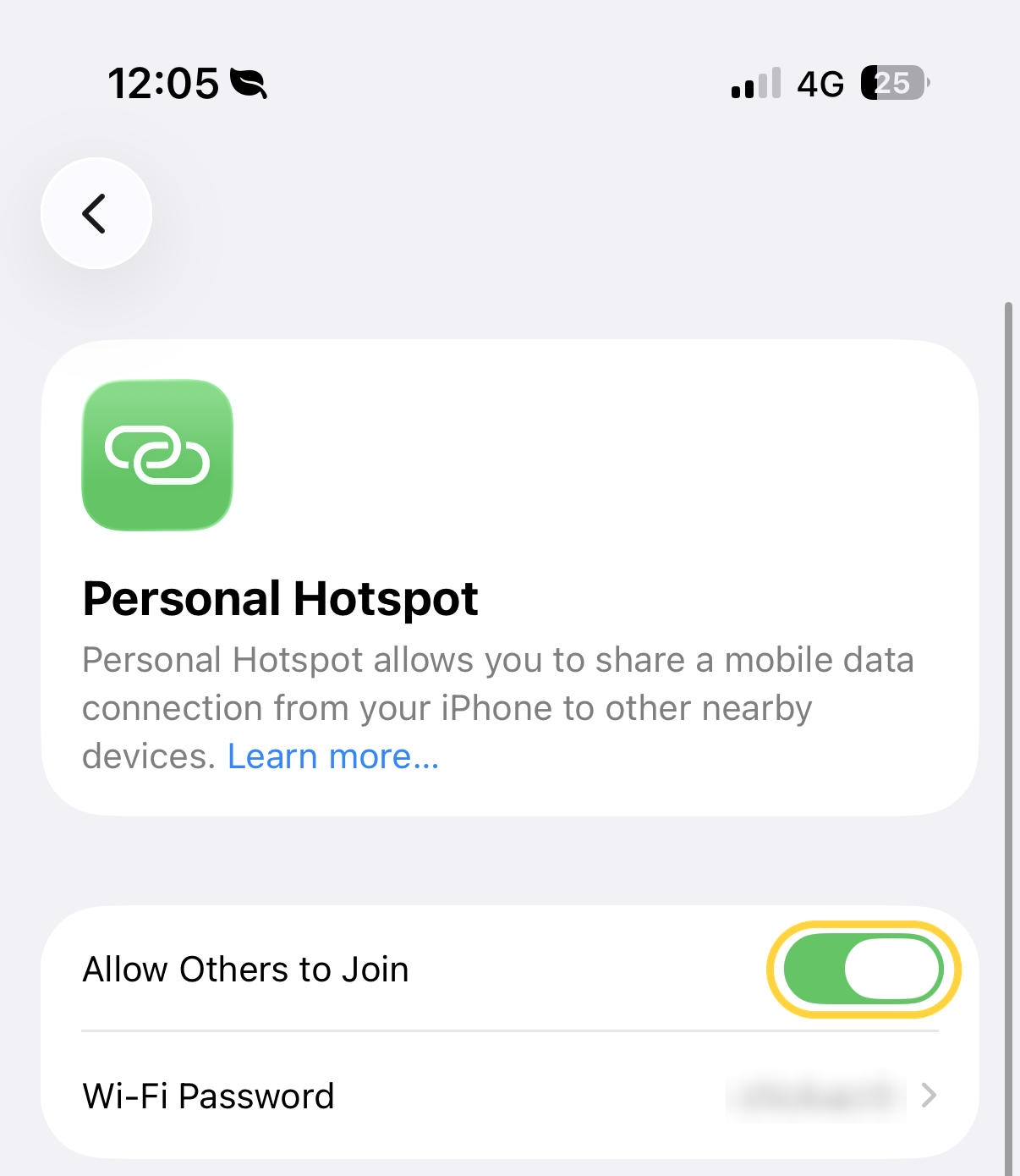
On an iPhone: "Settings", then "Personal Hotspot", then turn on "Allow Others to Join". The name and password your other devices need are on the same screen.
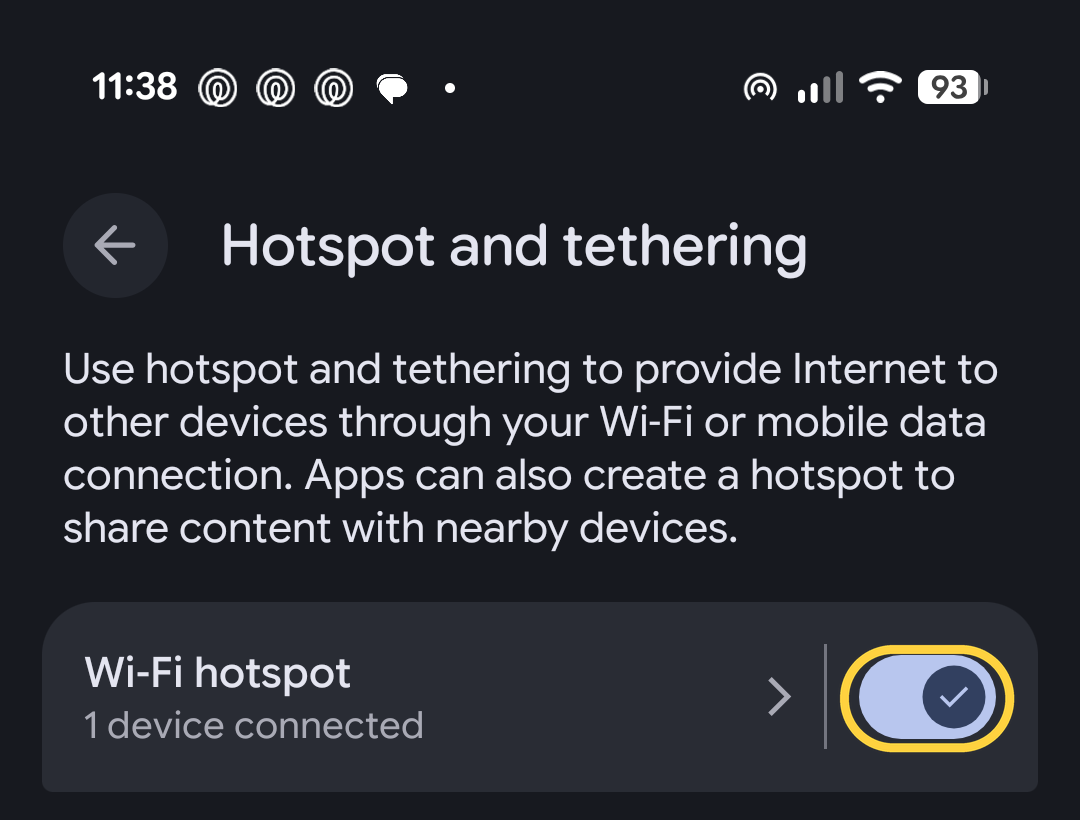
On Android: the wording varies between makes. On a Samsung it's "Settings", then "Connections", then "Mobile Hotspot and Tethering". On a Google Pixel it's "Settings", then "Network & internet", then "Hotspot & tethering". On most Android phones there's a quicker way: swipe down from the top of the screen and tap "Hotspot".
Then join it from the TV, tablet or laptop exactly as you'd join any WiFi at home.
Five things that make a big difference
Plug it in. A hotspot drains a battery fast and makes the phone warm, and a phone that's hot or running low slows down to protect itself.
Put it by a window. Signal struggles to get through the walls of many vans, especially those with steel sides or walls lined with aluminium. Glass lets it through far more easily, so a phone on the dashboard or a window ledge usually does better than one on the table.
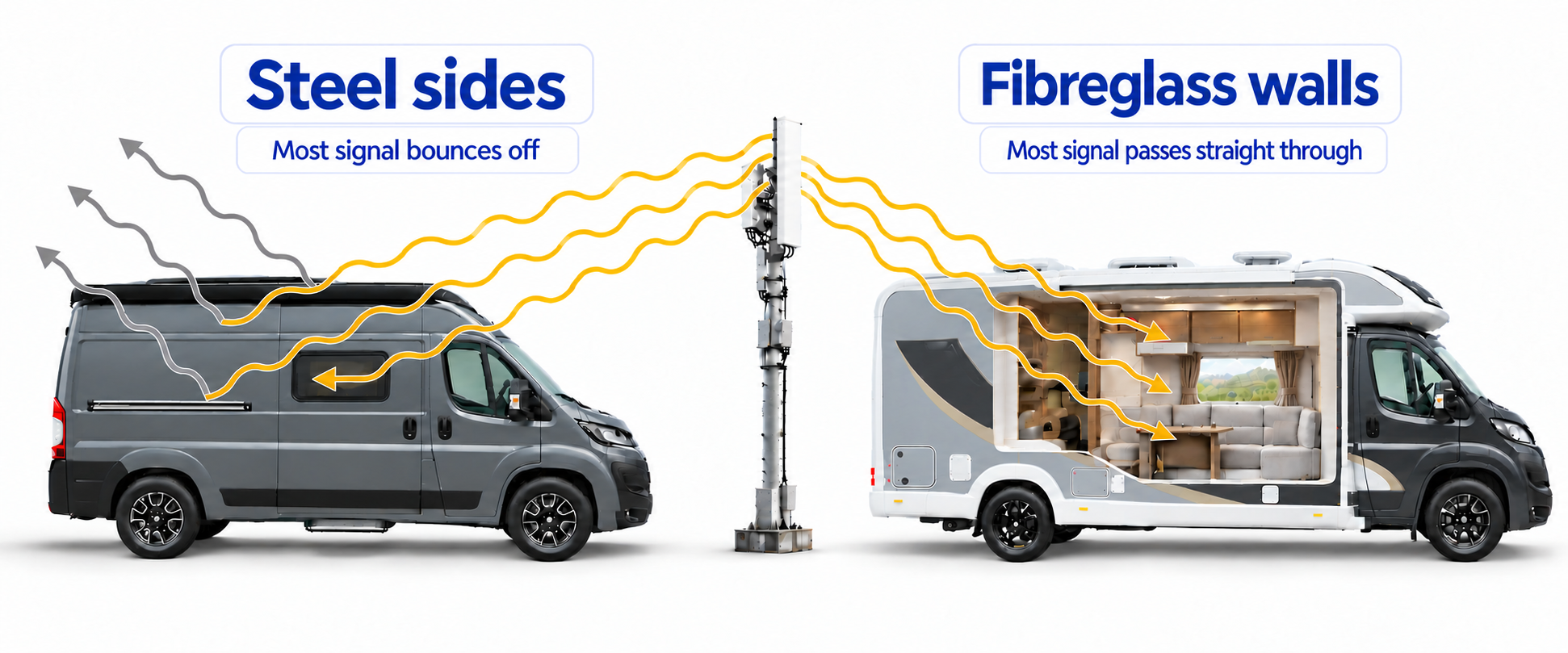
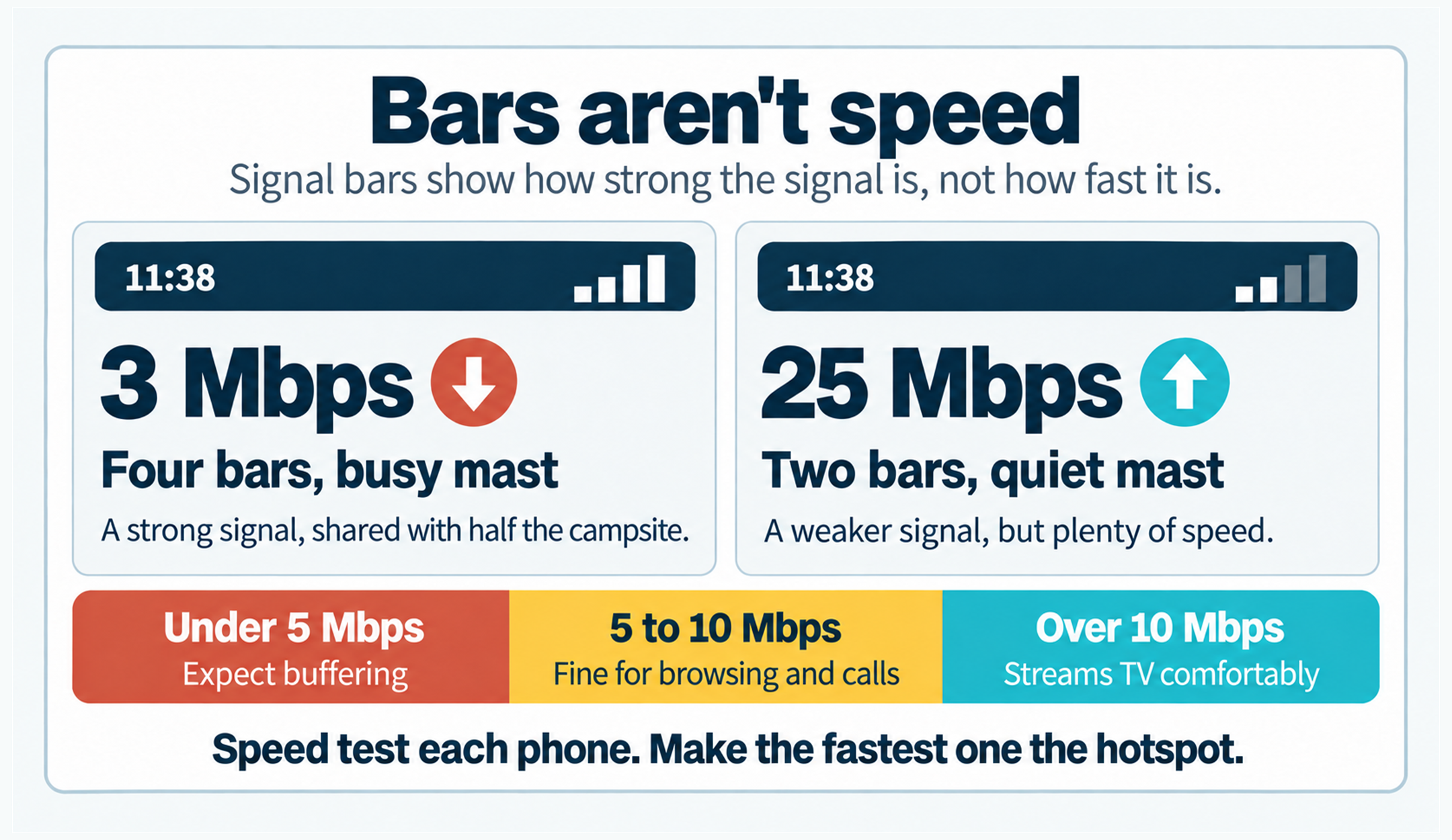
Steel sides block most of the signal. Fibreglass lets most of it through, and windows help either way. Use whichever phone has the fastest connection, not just the most bars. Signal bars only tell you how strong the signal is, not how fast it is. A phone showing four bars on a busy mast can be slower than one showing two. If there are two or three of you on different networks, run a quick speed test on each phone (see "If it's slow" below) and make the fastest one the hotspot for the evening.
Check your older devices can see it. If an older TV or tablet can't find the hotspot, turn on "Maximise compatibility" in the hotspot settings on an iPhone, or set the hotspot band to 2.4 GHz on an Android phone.
Watch the data on big days. If your plan isn't unlimited, keep an eye on it in your phone's settings, especially on wet days when the TV's on.
If it's slow
Before you blame the SIM, find out what's wrong. Get the free Speedtest app by Ookla, turn your phone's WiFi off so it's testing mobile signal rather than the campsite WiFi, and tap "Go" where you normally sit. Note the download speed. Then stand outside by the door and test again. Anything over about 10 Mbps will stream TV comfortably. Below about 5 Mbps, expect buffering.
- Much better outside? The van's walls are in the way. Move the phone to a window.
- Slow inside and out? The network is weak or busy here. Try a phone on a different network.
- Slow on every network? It's the site. Some places are just slow spots, as we found at Ferry Meadows. Nothing you buy will fix that, though a different pitch sometimes helps.
Don't let a SIM go to sleep
If your backup phone, or a spare SIM in a drawer, goes unused for months, it can be switched off for good. The rules vary a lot.
| Brand | Switched off after | What keeps it alive |
|---|---|---|
| giffgaff | 6 months of no use | A call, text, data use or a top-up |
| Tesco Mobile (pay as you go) | 6 months of no use | Using the phone |
| SMARTY | About 220 days with no plan (they warn you 40 days before) | Buying a plan |
| iD Mobile (pay as you go) | 4 months with no paid activity | A chargeable call, text or data use |
| 1pMobile | Minimum £10 spend every 60 to 120 days, depending on when you joined | Topping up and using it |
giffgaff
- Switched off after
- 6 months of no use
- What keeps it alive
- A call, text, data use or a top-up
Tesco Mobile (pay as you go)
- Switched off after
- 6 months of no use
- What keeps it alive
- Using the phone
SMARTY
- Switched off after
- About 220 days with no plan (they warn you 40 days before)
- What keeps it alive
- Buying a plan
iD Mobile (pay as you go)
- Switched off after
- 4 months with no paid activity
- What keeps it alive
- A chargeable call, text or data use
1pMobile
- Switched off after
- Minimum £10 spend every 60 to 120 days, depending on when you joined
- What keeps it alive
- Topping up and using it
The easy fix is a reminder in your phone every three months while the van's laid up. When it goes off, make a call or use a bit of data.
So, what now?
Start with the phones you've already got. Check which network each one is on. If you're all on the same one, that's the first thing to change, and on a 30-day plan you can do it this month. Then use the five checks above to pick the plan, and set a reminder for the day any offer runs out.
If you find a plan that works brilliantly where you tour, or one that lets you down, we'd love to hear about it. Email hello@touringsorted.co.uk or message us on Facebook, and we'll keep this guide up to date with what readers tell us.
Happy touring!